Source: https://oguzerol.com/en/agentic_ai_skills/google_antigravity_7_orchestration_rules_neon_carbon_swarm/ # 7 Google Antigravity Orchestration Rules: Neon, Carbon & Swarm [Oğuz Erol](https://oguzerol.com/en/about-me/)11 min readPublished: 19 November 2026Video length 2:59 ## On YouTube 7 Google Antigravity Orchestration Rules: Neon, Carbon & Swarm Keeping the heaviest model on every tiny step, or messaging a busy agent and breaking its focus, slows your whole day down. In episode two of our Google Antigravity series, we unlock model gears and multi-agent orchestration. Full description The 7 orchestration rules in this video: 1. Model gears: Don't leave plain Carbon on high for minor steps; pair Carbon or Orchestrator Carbon (where Carbon plans and Hydrogen executes) with the new Gemini 4 Neon for daily work, pick Hydrogen directly for well-defined speed tasks, or lower /effort in the terminal. 2. Messaging mid-run: Typing during a long job never breaks an active command mid-flight. Default Queue holds your note until the turn ends, while Send Immediately or Alt+M in the terminal injects it right after the active step. Use it for course corrections—unrelated notes stay in history and scatter Carbon and Neon's focus. 3. Side questions (/btw): Keep quick file or setting questions out of main chat. /btw opens a read-only side tab in the desktop app or a terminal card without pausing execution or polluting primary memory. 4. Continuous goal lock (/goal): Stop babysitting long jobs typing keep going. Launch with /goal so Antigravity intercepts early stops and keeps repairing mistakes until real compiler and test evidence passes. 5. Adversarial deep reasoning (/boost): Reserve /boost for elusive race conditions and root-cause debugging. An isolated coder drafts a candidate patch, challenger passes probe edge cases to break and patch it, and the lead orchestrator audits every requirement before delivery. 6. Shared-board agent teams (/swarm & /teamwork): Invoke /swarm for non-overlapping parallel pieces or /teamwork for multi-milestone migrations. Workers communicate on a shared message board while a verifier checks diffs; give writers isolated repo copies and watch quota since workers inherit your selected model. 7. Dynamic workflows (/run-workflow): Instead of sending twenty separate prompts or spinning up a heavy /swarm to inspect twenty packages or pages, /run-workflow runs a short Python script that fans out fast sub-agents in the background and returns a clean summary table. Save this, you'll need it while working; share it so a friend benefits too, and follow for Part 1's seven essentials and the seven expert rules in Part 3. Gemini Neon, Carbon and Hydrogen comparison: https://youtu.be/Xg9X689XQ74 Written guide & whiteboard visuals: https://oguzerol.com/en/agentic_ai_skills/google_antigravity_7_orchestration_rules_neon_carbon_swarm/ Google Antigravity 3-Part Series: - Part 1 (7 Essentials): https://youtu.be/A0IbSMc5kKo - Part 2 (7 Orchestration Rules): https://youtu.be/UXY5oCwvYjY - Part 3 (7 Expert Rules): https://youtu.be/teHZSD0XZPs [Watch on YouTube(opens in a new tab)](https://www.youtube.com/watch?v=UXY5oCwvYjY)[All channel videos](https://oguzerol.com/en/agentic_ai_skills/) Once you start delegating real engineering work to an [AI agent](https://oguzerol.com/en/what-is-an-ai-agent/), the bottleneck is rarely model intelligence—it is orchestration discipline. Leaving your heaviest reasoning model engaged on every trivial file read, interrupting a half-hour run with unrelated questions that linger in conversation memory, or stepping through twenty modules sequentially in one thread quietly stalls your whole day. Following [Part 1 on the seven essentials you need to know in Google Antigravity](https://oguzerol.com/en/agentic_ai_skills/google_antigravity_7_essentials_to_know/), this Part 2 guide opens up the seven orchestration rules that turn a single prompt into a fast, coordinated engineering bench. Think of these rules as your conductor desk: how to shift gears across models without manual friction, how to steer or query a running agent without breaking context, how to enforce proof-driven completion, and how to pick the right parallel execution engine when work scales beyond one thread. 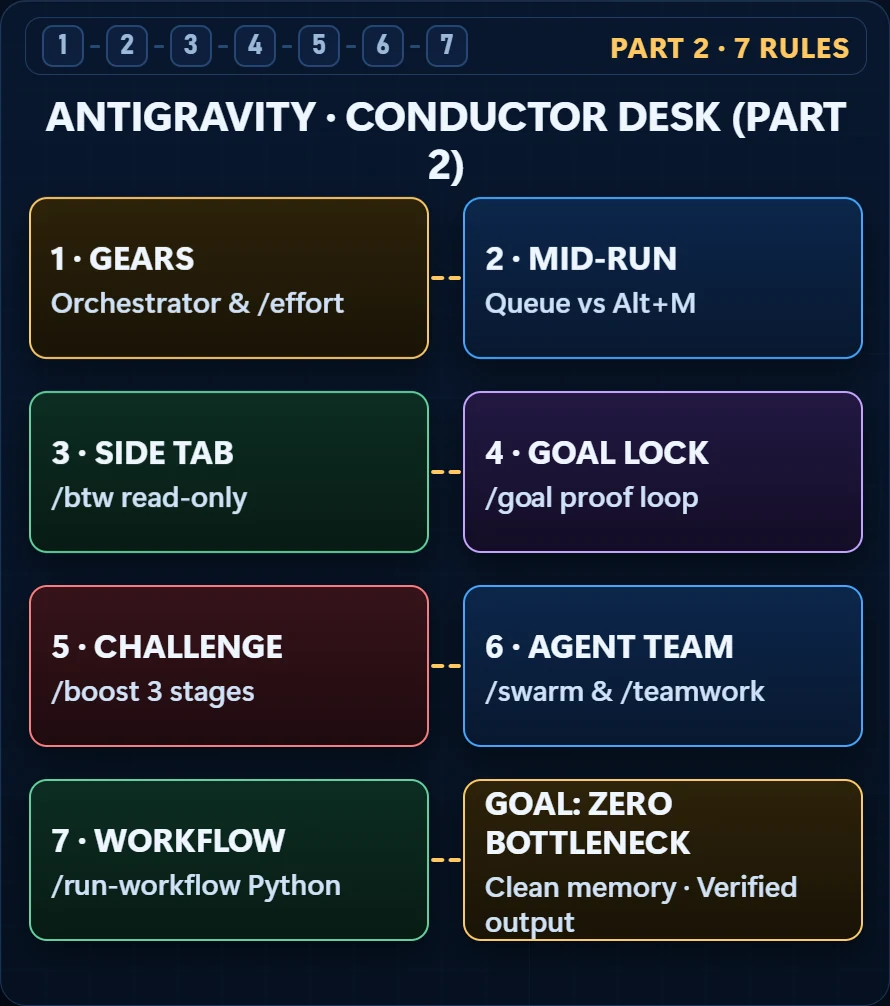 ## 1. Model gears: Carbon, Orchestrator Carbon, Gemini 4 Neon, and Hydrogen The most common slowdown in Antigravity happens before you even type a task: leaving the picker on plain **Carbon** in high reasoning mode all day. Even before reading a small config file or applying a minor edit, plain Carbon on high generates extended internal thinking blocks. You end up waiting not because the step is hard, but because the gear is locked too high. As mapped out in our [Gemini Neon, Carbon, and Hydrogen comparison](https://oguzerol.com/en/agentic_ai_skills/gemini_neon_balanced_between_carbon_and_hydrogen/), different phases of real work belong in different gears: - **Hard architecture with Carbon and Orchestrator (Carbon):** Reserve direct `Carbon` or **Orchestrator (Carbon)** for demanding architecture, tricky refactors, and high-stakes verification. In Orchestrator mode, `Carbon` handles planning and review while handing code edits and test execution to fast `Hydrogen` workers—automatically routing control back to the planner whenever unexpected friction appears. - **Everyday engineering with Gemini 4 Neon:** Pair `Carbon` or `Orchestrator (Carbon)` with the new **Gemini 4 Neon** and **Orchestrator (Neon)** for daily builds, giving you near-Carbon reasoning quality with noticeably lower latency. - **Pure speed with Hydrogen:** When a task is tightly scoped and unambiguous, switch directly to **Hydrogen** for brisk execution. - **Tuning depth with `/effort` in CLI:** In the Antigravity terminal, run `/effort` (`low`, `medium`, `high`) to dial thinking depth down on standard models when speed matters. Keep the surface distinction in mind: `/effort` adjusts standard models, whereas `Orchestrator` modes operate with a fixed planning budget. 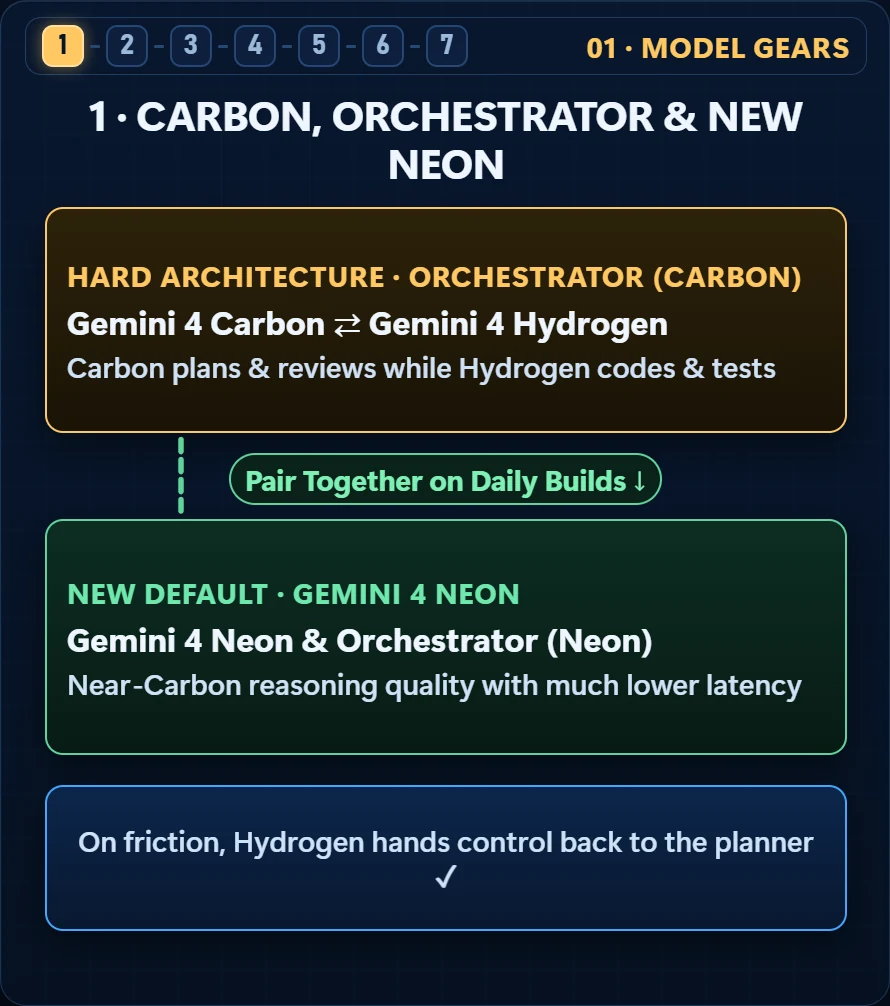 ## 2. Messaging mid-run: Queue, Send Immediately, and Alt+M Many developers watch a long-running task drift in the wrong direction simply because they are afraid typing a message will crash an active terminal command. In Antigravity, typing during a half-hour run never breaks an active command mid-flight. You only decide when your note enters the loop. | Mode / Shortcut | Surface | When Your Note Is Read | Best Used For | | --- | --- | --- | --- | | **Queue (Default)** | Desktop App & CLI | Held until the current turn finishes completely | Follow-up work that should wait for the current pass to wrap up | | **Send Immediately / Send Now** | Desktop App | Completes the active step and injects right before the next step | Catching drift early so the agent switches direction immediately | | **Alt+M** | Antigravity CLI | Completes the active step and injects before the next step | Course-correcting a running CLI task without aborting commands | Discipline matters just as much as timing. A targeted course correction on the active task—for example, telling the agent to validate a payment schema against updated rules—can rescue thirty minutes of wasted work. By contrast, tossing an unrelated question into the same stream writes it into primary conversation history permanently, scattering **Carbon** and **Neon**’s focus on every subsequent step. 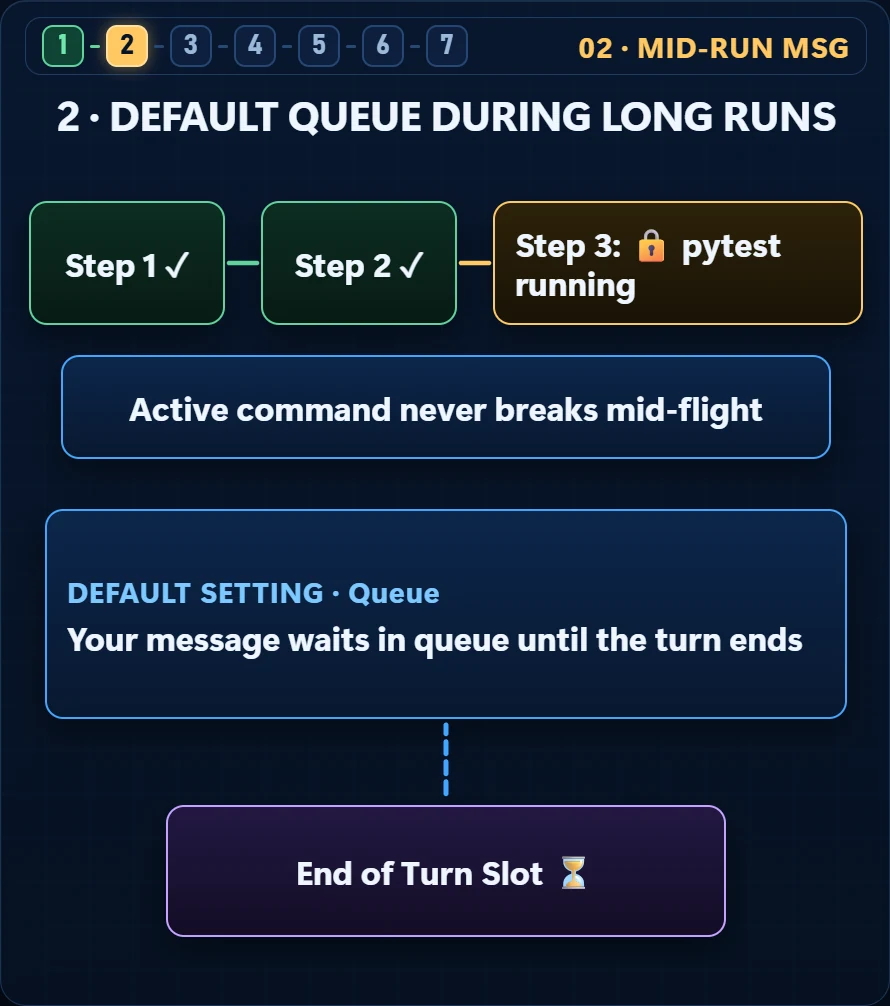 ## 3. Side questions mid-task: the read-only /btw fork Whenever a quick side question pops into your head while a task is already running—such as which file defines a timeout or what port a service binds to—keep it completely out of main chat and type `/btw`. `/btw` forks a **read-only copy** of your current conversation without touching execution: - **In the desktop app:** It opens an isolated **Side Question** tab alongside your active workspace. - **In the terminal (CLI):** It displays a lightweight `/btw` overlay card above the prompt. - **Strict read-only scope:** The side query can read files and search the repository, while file edits and mutating commands remain locked out. Because the main agent never pauses for a single second and nothing from the `/btw` side tab is ever written back into main chat memory, your primary context stays clean while you get immediate answers. 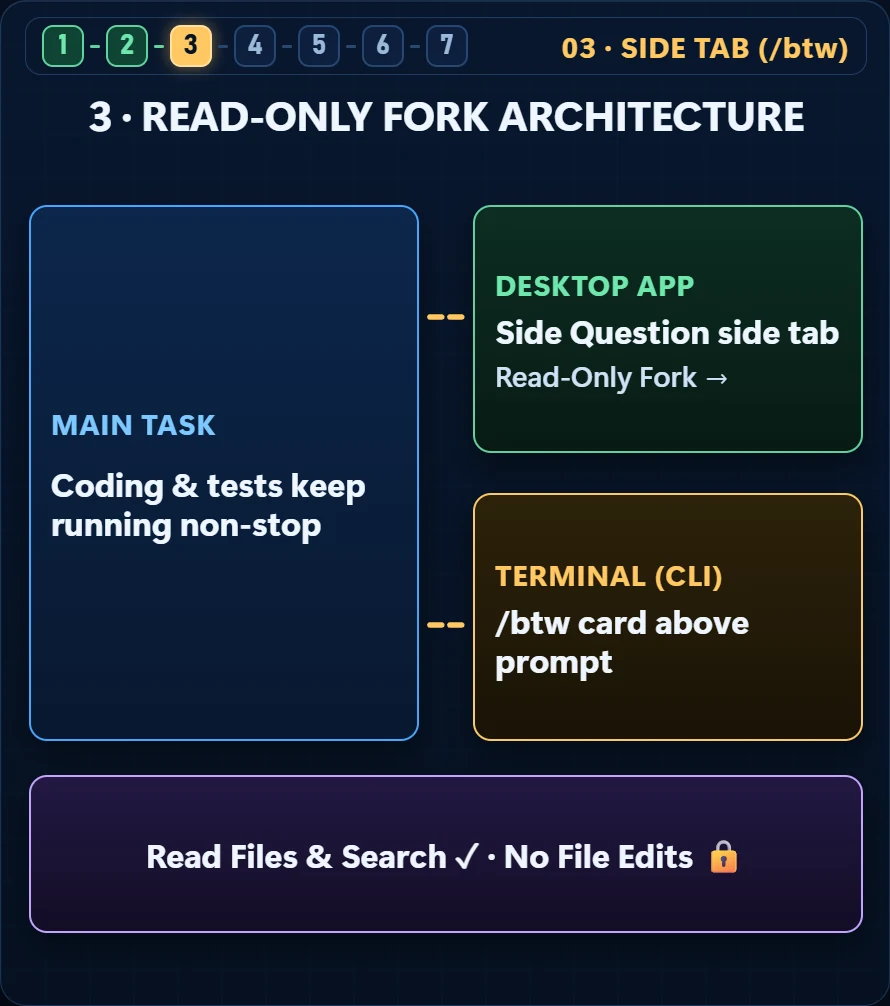 ## 4. Continuous goal lock: /goal and the stop-hook verification loop On multi-step jobs where your scope and completion criteria are clear upfront, babysitting the prompt and repeatedly typing “keep going” burns attention on turns the agent can verify itself. Launch those tasks with `/goal` instead. Under `/goal`, Antigravity enforces a **Goal Stop Hook**: 1. Whenever the agent attempts to wrap up early, Antigravity intercepts the halt before closing the run. 2. It evaluates your deliverables against real compiler output, build checks, and test suite results. 3. If errors or failing tests remain, the agent reads the failure output, repairs its own mistakes, and reruns verification automatically. 4. Only once every build and test criterion passes with zero errors does the active goal reach `Completed`. Important boundary: `/goal` automates persistence around verification—it does not bypass your configured workspace or tool permission rules. Protected or destructive actions still wait for your approval.  ## 5. Adversarial deep reasoning: the three-stage /boost pipeline Do not waste `/boost` on routine copy tweaks or straightforward daily edits. Its multi-round design is built for elusive race conditions, intermittent deadlocks, and hard root-cause debugging where first-pass fixes miss subtle edge cases. `/boost` orchestrates three distinct stages in isolation: 1. **First Worker (Isolated Builder / Investigator):** Explores the repository in an isolated context, drafts a candidate patch, and runs initial verification tests. 2. **Challenger Passes (Adversarial Review):** Actively tries to break the candidate fix using edge cases and stress tests, closing any gaps uncovered during challenge rounds. 3. **Lead Orchestrator Audit:** Independently spot-checks every prompt requirement and real test log before delivery. If a gap remains, it triggers another challenge round; once verified, only the clean validated solution lands in your main chat while scratch logs stay out of sight.  ## 6. Shared-board agent teams: /swarm and /teamwork When a job naturally breaks into independent tracks, spinning up coordinated agent teams replaces sequential waiting with parallel progress. Choose the team pattern based on project horizon: - **`/swarm` (Non-Overlapping Parallel Pieces):** Ideal when distinct files, packages, or roles—such as separate test writers plus a dedicated **`@verifier`** auditing diffs and running tests—can advance concurrently in one coordinated burst. - **`/teamwork` (Large Multi-Milestone Migrations):** Designed for long-horizon migrations and major builds, starting with an upfront scoping interview (`Sentinel`) and organizing work into dedicated folders with milestone audit gates. Inside `/swarm`, your main chat acts as the **Coordinator**, assigning named workers that run in separate parallel sessions and communicate on a central **Shared Message Board** (`/swarm board` or `Alt+S` in CLI). Idle workers sleep in a `waiting` state costing zero tokens until addressed, waking reactively when new messages or reviews arrive. Two strict rules protect stability and quota when running teams: 1. **Never put two writers in the same file:** Concurrent edits to one file overwrite work silently. Always give parallel writers isolated repository copies (`share` or `branch` workspace modes). 2. **Watch shared model quota:** Every spawned worker inherits your active selected model by default, meaning a multi-agent team burns session quota noticeably faster than a single conversation.  ## 7. Dynamic workflows: /run-workflow Python fan-out Suppose you need to audit twenty packages, verify thirty markdown pages, or extract structured checks across dozens of modules. Firing twenty manual prompts bloats your chat history, while spinning up a full `/swarm` with a shared board adds unnecessary coordination overhead for uniform batch work. That is where **`/run-workflow`** fits cleanly. Antigravity generates a concise Python orchestration script—built around primitives like `phase` and `parallel`—that fans out fast **Hydrogen** sub-agents concurrently in the background. Because each child sub-agent reads files and searches logs inside its own separate conversation, verbose raw logs stay completely outside your main chat window. When the parallel sweep finishes, your main thread receives only a clean, structured summary table (such as schema-checked pass/fail rows per package). ### Choosing the right orchestration command | Scenario | Command | Why It Fits | | --- | --- | --- | | Long, well-scoped task needing guaranteed build/test proof | `/goal` | Stop hook prevents premature exit until real checks pass | | Elusive concurrency bug or subtle root-cause failure | `/boost` | Runs isolated builder, adversarial challenger, and orchestrator audit | | Collaborative parallel modules with diff verification | `/swarm` | Coordinates named workers and `@verifier` via a shared message board | | Multi-milestone migration or long-horizon architecture work | `/teamwork` | Adds upfront scoping interview and milestone audit gates | | Uniform batch inspection across dozens of files or pages | `/run-workflow` | Python fan-out runs fast background sub-agents into one clean table | Once model gears, non-destructive steering, and multi-agent orchestration are in place, the final layer is giving your agent durable institutional memory, safe remote server boundaries, and automated morning shifts—covered next in [Part 3: 7 Google Antigravity Expert Rules](https://oguzerol.com/en/agentic_ai_skills/google_antigravity_7_expert_rules_skills_learn_ssh_automation/).  ## Frequently Asked Questions ### Why doesn’t /effort apply to Orchestrator modes? The CLI `/effort` command adjusts internal thinking depth for standard configurable models (`Carbon`, `Neon`, and `Hydrogen`). `Orchestrator (Carbon)` and `Orchestrator (Neon)` already enforce a fixed two-tier planning and execution split, so you do not tune `/effort` on top of them. ### When should I use Send Immediately (Alt+M) versus /btw? Use `Send Immediately` in the app or `Alt+M` in the terminal when you want to redirect the active job immediately after the current step finishes—that note stays in conversation history. Use `/btw` when you only need a quick read-only lookup without pausing the main task or adding noise to primary memory. ### Does /goal override workspace safety and permission approvals? No. `/goal` enforces completion verification through its stop hook so the agent repairs failing builds and tests instead of stopping prematurely, while all standard tool permission policies and approval prompts remain active. ### How do I choose between /boost, /swarm, and /run-workflow? Pick `/boost` for a single hard bug needing adversarial testing, `/swarm` for distinct parallel deliverables that benefit from a shared board and a `@verifier`, and `/run-workflow` for uniform batch operations across many packages or pages where you only want a clean summary table back. ### How do I avoid file conflicts and runaway quota consumption in /swarm? Give concurrent writers isolated working copies (`share` or `branch`) so two workers never edit the same file at once, keep worker counts scoped to genuinely independent slices, and avoid leaving heavy reasoning models assigned to workers that only perform bounded reads or verification. [Back to top ↑](https://oguzerol.com/en/agentic_ai_skills/google_antigravity_7_orchestration_rules_neon_carbon_swarm/#icerik) ## Follow for content about AI - [YouTube@agentic_ai_skills(opens in a new tab)](https://www.youtube.com/@agentic_ai_skills) - [Instagram@agentic_ai_skills(opens in a new tab)](https://www.instagram.com/agentic_ai_skills/) - [Facebook@agentic.AI.skills(opens in a new tab)](https://www.facebook.com/agentic.AI.skills/) - [X@agenticAIskills(opens in a new tab)](https://x.com/agenticAIskills) - [TikTok@agentic_ai_skills(opens in a new tab)](https://www.tiktok.com/@agentic_ai_skills) - [WhatsApp+90 549 654 64 89(opens in a new tab)](https://wa.me/905496546489) ## More videos - [7 Google Antigravity Expert Rules: Skills, Learn, SSH & Automation19 November 20262:59](https://oguzerol.com/en/agentic_ai_skills/google_antigravity_7_expert_rules_skills_learn_ssh_automation/) - [7 Essentials You Need to Know When Using Google Antigravity19 November 20262:48](https://oguzerol.com/en/agentic_ai_skills/google_antigravity_7_essentials_to_know/) - [Gemini Neon Is Here: Balanced Between Carbon and Hydrogen19 November 20261:54](https://oguzerol.com/en/agentic_ai_skills/gemini_neon_balanced_between_carbon_and_hydrogen/) - [Don't Hunt for Free AI: Pay for It and Use It12 November 20262:52](https://oguzerol.com/en/agentic_ai_skills/dont_hunt_for_free_ai_pay_for_it/) - [From Chat to Autonomous Agents: 7 Stages22 October 20262:48](https://oguzerol.com/en/agentic_ai_skills/from_chat_to_autonomous_agents_7_stages/) - [Expense Tracking with AI Automation: Google Sheets or Excel16 October 20262:23](https://oguzerol.com/en/agentic_ai_skills/ai_automation_expense_tracking_google_sheets_excel/) - [Motion Design with Just Claude Opus: 32 Experiments and Prompts10 October 20262:58](https://oguzerol.com/en/agentic_ai_skills/motion_design_with_just_claude_opus/) - [Can You Run AI Locally on a 16 GB Graphics Card?8 October 20262:39](https://oguzerol.com/en/agentic_ai_skills/can_you_run_ai_locally_on_a_16gb_graphics_card/) - [Customer Wrote at Night, Request Ready by Morning26 September 20262:51](https://oguzerol.com/en/agentic_ai_skills/customer_wrote_at_night_request_ready_by_morning/) - [Give AI the Address, Not the Route: Which Job Goes to Which Model26 September 20262:51](https://oguzerol.com/en/agentic_ai_skills/give_ai_the_address_not_the_route/) - [Stop Using Excel and Google Sheets as a Database: To a Web App22 September 20262:47](https://oguzerol.com/en/agentic_ai_skills/stop_using_excel_and_sheets_as_a_database/) - [ADHD Didn't Change. The Tools Did: A Scattered Brain and Agents22 September 20262:52](https://oguzerol.com/en/agentic_ai_skills/adhd_the_tools_caught_up/) - [Can AI Fix Its Own Mistakes? I Checked It Is Not I Fixed It20 September 20262:51](https://oguzerol.com/en/agentic_ai_skills/can_ai_fix_its_own_mistakes/) - [OpenRouter and Hugging Face Aren't Models: Three Ways In18 September 20262:53](https://oguzerol.com/en/agentic_ai_skills/openrouter_hugging_face_three_ways/) - [How Do AI Agents Work? Same Model, Different Results13 September 20262:52](https://oguzerol.com/en/agentic_ai_skills/how_ai_agents_work/) - [AI Agents for AEC Firms: How the Five-Layer Setup Works6 September 20262:42](https://oguzerol.com/en/agentic_ai_skills/ai_agents_for_aec_firms/)