Source: https://oguzerol.com/en/agentic_ai_skills/gemini_neon_balanced_between_carbon_and_hydrogen/ # Gemini Neon Is Here: Balanced Between Carbon and Hydrogen [Oğuz Erol](https://oguzerol.com/en/about-me/)8 min readPublished: 19 November 2026Video length 1:54 ## On YouTube Gemini Neon Is Here: The Balanced Model Between Carbon and Hydrogen Gemini Neon is here. Built as a balanced model between Carbon and Hydrogen, the new Neon closes the gap between speed, task cost, and frontier reasoning. Full description In this video we map out all three models and how they work together inside Google Antigravity: 1. Hydrogen: Open free tier, lowest token cost, and parallel file/search batching for everyday coding, live UI prototypes, and fast worker subagents. 2. Neon: Adapted from Carbon and unlocked on Pro and Ultra; its default mode keeps task bills well below Carbon while its extra-high mode tops benchmarks in science, legal research, financial modeling, and Antigravity coding. 3. Carbon: The final arbiter for full-context scans, subtle concurrency bugs, sustained agent swarms, and deep security audits. 4. Antigravity & Orchestrator: Inside Google Antigravity (Gemini's counterpart to Claude Code and ChatGPT Codex), picking Orchestrator from the model menu keeps tough planning on your lead model while automatically handing code edits and tests to fast Hydrogen workers. Up next is our series on the 7 things you need to know to use Antigravity—follow along and save this breakdown. Previous video, don't hunt for free AI, pay for it and use it: https://youtu.be/NMa1H-bbLpQ [Watch on YouTube(opens in a new tab)](https://www.youtube.com/watch?v=Xg9X689XQ74)[All channel videos](https://oguzerol.com/en/agentic_ai_skills/) One of the quickest ways to burn through both your time and your session quota when working with an [AI agent](https://oguzerol.com/en/what-is-an-ai-agent/) is routing every single prompt to the heaviest model you have. If you fire up a frontier reasoning model just to scan a handful of files or tweak a button style, you wait longer and drain your usage allowance for no real gain. Going to the other extreme hurts too: hand a tricky multi-file refactor or subtle architectural trade-off to a lightweight speed model, and you end up fixing the same mistake three times. Google’s new **Gemini Neon** release steps right into that gap between **Hydrogen** and **Carbon**. On this page I break down the three-model map from the video, explain where Hydrogen, Neon, and Carbon each earn their keep, and show how **Orchestrator** mode inside **Google Antigravity** coordinates them automatically in a single session. 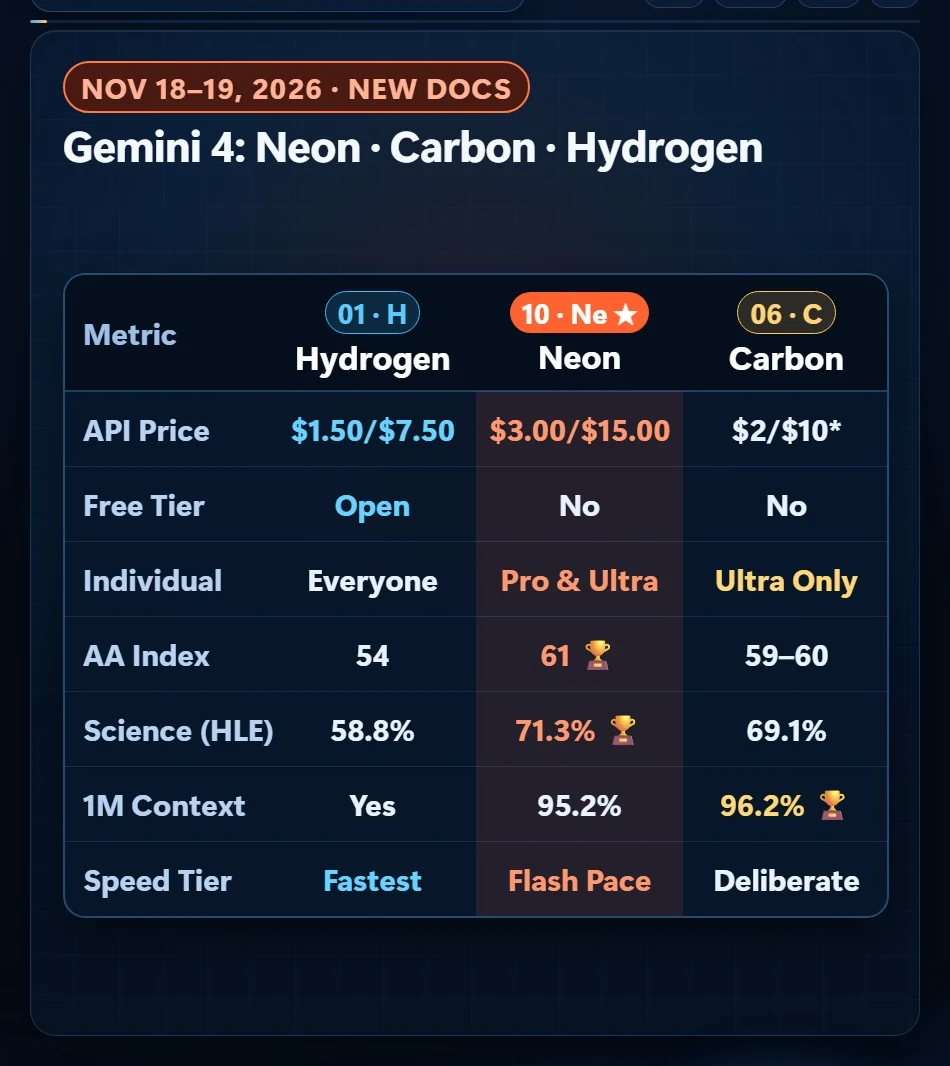 ## 1. Three models, three distinct operating gears Having three sibling models inside the same generation makes much more sense once you look at what real engineering and content workflows actually consist of. Most of the steps in a typical workday are bounded, mechanical operations: reading files, searching logs, parsing documents, or wiring up straightforward UI components. A smaller slice demands careful multi-step synthesis across modules, and only a narrow slice requires war-room root-cause investigation across an entire repository. Think of the lineup as three roles on a field crew: an agile crew lead keeping everyday tasks moving in parallel, a lead field engineer handling demanding technical problems without blowing the budget, and a chief architect called in for the hardest structural decisions. Matching the model to the step keeps both latency and quota under control. ## 2. Hydrogen: the parallel-first crew lead **Hydrogen** is the entry point of the Gemini 4 lineup, built for brisk everyday execution and background worker duties. With an open free API tier and the lowest token cost of the trio, it serves as the natural default engine for high-frequency tasks. What makes Hydrogen feel snappy in agentic workflows goes beyond raw output speed: instead of reading files and running searches one after another in a slow sequential chain, it batches reads and searches in parallel. When an agent needs to inspect a dozen files, spin up live UI prototypes, parse structured documents, or run verification checks as a sub-agent, Hydrogen clears the queue quickly so heavier models never have to waste turns on legwork.  ## 3. Gemini Neon: the balanced field engineer between Carbon and Hydrogen Adapted directly from Carbon and unlocked for both Pro and Ultra subscribers on individual plans, **Gemini Neon** is built to be the everyday sweet spot of the family. Its strength comes from how cleanly it spans two different operating modes. In its default thinking tier, Neon is far more disciplined with internal reasoning tokens than Carbon, keeping per-task bills noticeably lighter while still catching architectural nuances that trip up smaller models. When a task genuinely calls for maximum depth, switching Neon into its extra-high reasoning tier pushes it to the top of benchmarks in scientific reasoning, legal and tax analysis, financial modeling, and full-repo coding inside Antigravity. Whenever a task feels too intricate for Hydrogen yet doesn’t justify bringing out Carbon, Neon is the model that bridges the two without forcing a compromise.  ## 4. Carbon: the chief architect in the war room **Carbon** sits at the heavy end of the lineup. Reserved for Ultra on individual subscriptions and occupying the top price tier once its introductory window closes, Carbon is not meant to be your default chat picker for routine edits. Where Carbon shines is the class of problems where faster models stall or lose the thread across massive context windows: full-repository scans, elusive concurrency and race-condition bugs, sustained multi-agent `/swarm` runs, and deep security audits that require step-by-step proof. Treating Carbon as the final arbiter for high-stakes architecture and debugging—rather than a hammer for every nail—lets you get its best work without burning through your quota midday.  ## 5. What Google Antigravity is—and how it differs from a chat window Throughout the video I show these models inside **Google Antigravity**. If you are new to the name, think of Antigravity as Gemini’s counterpart to Claude Code and ChatGPT Codex. For a broader look at how instructions, connectors, and permissions turn a model into a working system, see [what an agent harness is](https://oguzerol.com/en/what-is-a-harness-in-ai-agents/) and the companion guide to our previous video, [don’t hunt for free AI: pay for it and use it](https://oguzerol.com/en/agentic_ai_skills/dont_hunt_for_free_ai_pay_for_it/). In a standard browser chat box, the model gives you advice or code snippets and leaves you to copy, paste, run commands, and ferry error messages back and forth. Antigravity runs directly against your project workspace: it opens and edits files on your machine, executes terminal commands and test suites, reads the output, and finishes the task end to end while pausing at your approval gates for sensitive actions.  ## 6. Picking Orchestrator in the model menu: automatic handoff instead of manual switching Knowing what each model is good at is helpful, but manually flipping the model dropdown every five minutes—Neon for planning, Hydrogen for file edits, back to Neon for review—breaks your concentration. That is why Antigravity includes **Orchestrator (Neon)** and **Orchestrator (Carbon)** right inside the model picker. When you select `Orchestrator (Neon)` or `Orchestrator (Carbon)` from the menu, Antigravity splits the work across two tiers inside the same conversation: 1. **Planning and hard calls:** Architecture, task decomposition, ambiguous debugging, and final verification stay on your chosen lead model (Neon or Carbon). 2. **Execution and test runs:** Parallel file reads, mechanical code edits, and test suite runs automatically hand off to fast **Hydrogen** worker sub-agents. You keep frontier judgment on the decisions that matter while letting nimble workers handle the repetitive steps—saving both wall-clock time and quota without touching the menu mid-task.  ## 7. A practical rule of thumb—and what comes next For day-to-day work, a clean division of labor looks like this: lean on **Hydrogen** for fast parallel reads, live UI prototypes, and worker sub-agents; use **Neon** as your primary engine for demanding coding, legal, financial, and analytical tasks; and reserve **Carbon** for full-context investigations, concurrency bugs, and security audits. Or simply pick **Orchestrator** in Antigravity and let the workspace route those steps for you. Up next, we are launching a dedicated series covering the **seven things you need to know to use Antigravity** effectively from day one.  ## Frequently Asked Questions ### Where does Gemini Neon fit between Hydrogen and Carbon? Neon bridges Hydrogen’s everyday speed and Carbon’s deep reasoning: in its default mode it keeps per-task token spend lean for daily engineering, while its extra-high mode reaches top-tier performance on hard coding, scientific, legal, and financial tasks. ### Why not just use Hydrogen for everything? Hydrogen excels at parallel file reads, searches, prototypes, and bounded edits, but complex multi-file architecture and nuanced domain reasoning benefit from Neon’s stronger synthesis. ### When is Carbon still worth picking over Neon? Carbon remains the right call for full-window repository scans, subtle concurrency bugs where faster models stall, long-horizon multi-agent swarms, and rigorous security audits. ### What is Google Antigravity? Google Antigravity is Gemini’s agentic desktop workspace—comparable to Claude Code and ChatGPT Codex—that opens files on your computer, runs terminal commands, and completes multi-step tasks instead of stopping at chat replies. ### What does Orchestrator mode do in Antigravity? Selecting Orchestrator Neon or Orchestrator Carbon keeps planning and tough architectural decisions on that lead model while automatically delegating code edits, searches, and test runs to fast Hydrogen sub-agents in the same session. [Back to top ↑](https://oguzerol.com/en/agentic_ai_skills/gemini_neon_balanced_between_carbon_and_hydrogen/#icerik) ## Follow for content about AI - [YouTube@agentic_ai_skills(opens in a new tab)](https://www.youtube.com/@agentic_ai_skills) - [Instagram@agentic_ai_skills(opens in a new tab)](https://www.instagram.com/agentic_ai_skills/) - [Facebook@agentic.AI.skills(opens in a new tab)](https://www.facebook.com/agentic.AI.skills/) - [X@agenticAIskills(opens in a new tab)](https://x.com/agenticAIskills) - [TikTok@agentic_ai_skills(opens in a new tab)](https://www.tiktok.com/@agentic_ai_skills) - [WhatsApp+90 549 654 64 89(opens in a new tab)](https://wa.me/905496546489) ## More videos - [7 Google Antigravity Expert Rules: Skills, Learn, SSH & Automation19 November 20262:59](https://oguzerol.com/en/agentic_ai_skills/google_antigravity_7_expert_rules_skills_learn_ssh_automation/) - [7 Google Antigravity Orchestration Rules: Neon, Carbon & Swarm19 November 20262:59](https://oguzerol.com/en/agentic_ai_skills/google_antigravity_7_orchestration_rules_neon_carbon_swarm/) - [7 Essentials You Need to Know When Using Google Antigravity19 November 20262:48](https://oguzerol.com/en/agentic_ai_skills/google_antigravity_7_essentials_to_know/) - [Don't Hunt for Free AI: Pay for It and Use It12 November 20262:52](https://oguzerol.com/en/agentic_ai_skills/dont_hunt_for_free_ai_pay_for_it/) - [From Chat to Autonomous Agents: 7 Stages22 October 20262:48](https://oguzerol.com/en/agentic_ai_skills/from_chat_to_autonomous_agents_7_stages/) - [Expense Tracking with AI Automation: Google Sheets or Excel16 October 20262:23](https://oguzerol.com/en/agentic_ai_skills/ai_automation_expense_tracking_google_sheets_excel/) - [Motion Design with Just Claude Opus: 32 Experiments and Prompts10 October 20262:58](https://oguzerol.com/en/agentic_ai_skills/motion_design_with_just_claude_opus/) - [Can You Run AI Locally on a 16 GB Graphics Card?8 October 20262:39](https://oguzerol.com/en/agentic_ai_skills/can_you_run_ai_locally_on_a_16gb_graphics_card/) - [Customer Wrote at Night, Request Ready by Morning26 September 20262:51](https://oguzerol.com/en/agentic_ai_skills/customer_wrote_at_night_request_ready_by_morning/) - [Give AI the Address, Not the Route: Which Job Goes to Which Model26 September 20262:51](https://oguzerol.com/en/agentic_ai_skills/give_ai_the_address_not_the_route/) - [Stop Using Excel and Google Sheets as a Database: To a Web App22 September 20262:47](https://oguzerol.com/en/agentic_ai_skills/stop_using_excel_and_sheets_as_a_database/) - [ADHD Didn't Change. The Tools Did: A Scattered Brain and Agents22 September 20262:52](https://oguzerol.com/en/agentic_ai_skills/adhd_the_tools_caught_up/) - [Can AI Fix Its Own Mistakes? I Checked It Is Not I Fixed It20 September 20262:51](https://oguzerol.com/en/agentic_ai_skills/can_ai_fix_its_own_mistakes/) - [OpenRouter and Hugging Face Aren't Models: Three Ways In18 September 20262:53](https://oguzerol.com/en/agentic_ai_skills/openrouter_hugging_face_three_ways/) - [How Do AI Agents Work? Same Model, Different Results13 September 20262:52](https://oguzerol.com/en/agentic_ai_skills/how_ai_agents_work/) - [AI Agents for AEC Firms: How the Five-Layer Setup Works6 September 20262:42](https://oguzerol.com/en/agentic_ai_skills/ai_agents_for_aec_firms/)